Make a Payout
- Review commission due on the dashboard or Consignors page, then choose New payout for a consignor. The payout starts with the sales that are eligible under your payout settings.
- Review the sales and quantities, remove any you do not want to pay yet, and check the total. Add a note, an overall adjustment or additional items if needed. Confirm the consignor and amount before paying.
- Pay the consignor outside Consignify using your usual method. Consignify records the payment but does not send money or process payments. A payout gets its reference only when you save it. If you want the reference in your payment records, choose Save as unpaid before paying, then mark the payout as paid once payment is complete (see “Save now and pay later” below).
- Once payment is complete, choose Save as paid. This records the payment and makes the payout visible in the consignor portal. To also email the consignor a receipt, choose Save as paid and send receipt instead.
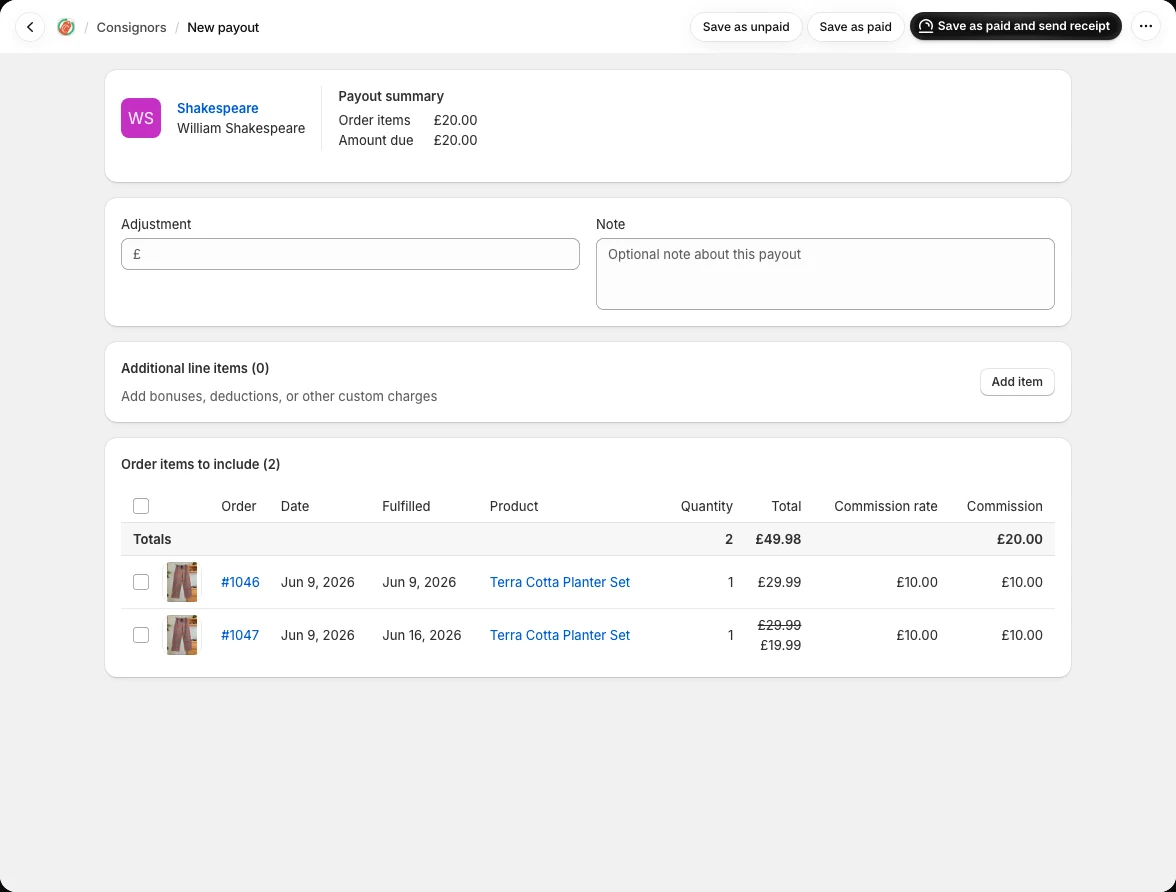
Adjustments and additional items
Use an adjustment for a single change to the total, or additional items to explain separate amounts on the receipt. Positive amounts increase the payout; negative amounts reduce it. For example, a 10.00 bonus and a -5.00 fee increase the payout by 5.00 overall.
Save now and pay later
Choose Save as unpaid if you need a reference first or will make the payment later. Included sales are reserved in that payout so they cannot be paid twice. You can edit the unpaid payout, then pay externally and mark it as paid. Unpaid payouts are hidden from the consignor portal. Saving a payout fixes the commission amounts for its included sales; paid payouts keep their financial details, though you can still edit the note.
Once marked as paid, included items will be marked as paid, and the payout record is available in the payouts tab, payouts page, and in the consignor's portal (if enabled).
Receipts and records
Open a paid payout to view its details, print the receipt or send it by email. Add the consignor’s email and your shop contact details before sending receipts. You can export payout records from Payouts › Import/export for your accounts.