Review your sales
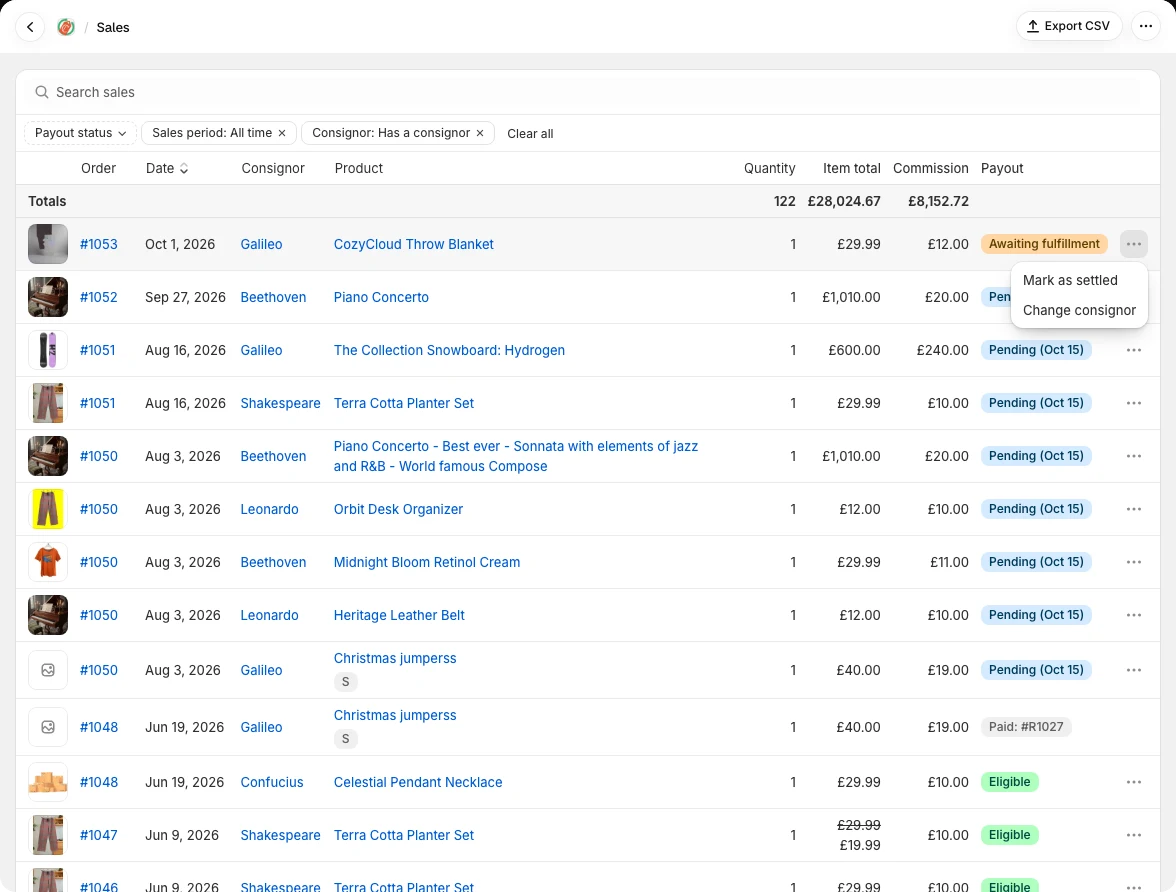
The Sales page shows the items sold and their payout status. Use the sales-period and payout-status filters to focus on a month or on sales awaiting payout, and use search to find a sale. A consignor’s Sales tab shows their own sales.
By default, Sales shows items with a consignor. Choose No consignor to find sales that still need an owner, or All sales for the wider view. Use a row’s ⋯ menu to change its consignor or mark an already-accounted-for sale as settled. Export CSV when you need a spreadsheet of the filtered sales.
- Unfulfilled — not eligible for payout.
- Pending — fulfilled but still within the holding period and not yet eligible.
- Eligible — holding period passed and the item can be included in a payout.
- Unpaid — included in an unpaid payout that hasn't been marked as paid yet.
- Paid — once included in a payout and marked as paid, the line item is marked as paid.
- Orders prior to the chosen tracking start date are considered settled and are not eligible for payouts.
Settle Sales
A settled sale is one you have already accounted for without recording a payout in Consignify — for example, sales you paid out through a previous system. Settled sales still appear in your sales history, but they are excluded from payouts and earn no commission. There are two places to settle a sale:
From your sales
- Open Sales, or the Sales tab on a consignor, and find the sale.
- Open the ⋯ menu at the end of the sale's row, choose Mark as settled, and confirm. The sale's status in the Payout column changes to Settled.
- Changed your mind? Open the ⋯ menu of a sale you settled yourself, choose Mark as unsettled, and confirm to restore the sale's normal payout status.
The same menu has Change consignor, to move a sale that isn't in a payout to another consignor or to none. See the FAQ on changing a product's consignor.
While building a payout
- On a new payout, tick the sales you have already paid for and choose Mark as settled.
- They are settled straight away and leave the payout. Settling is not part of the draft — it applies even if you never save the payout, and it is undone from the Sales page.
Sales from before your settled date are settled automatically, and their menu has no settle action. Change that date under Payout eligibility in your settings instead.
A sale that is already part of a saved payout cannot be settled. Remove it from that payout first, or delete the payout.